


Specialty Produce
3.5258.00 Reviews
App Specs
- Version
- 8.4.3
- Updated On
- License
- Free
- Downloads
- 100,000+
- Developer
- Specialty Produce Productions
- Categories
- Food & Drink
- Platform
- Android
Screenshots
 Analysis by AppCompare
Ever been at the grocery store, looking at a peculiar fruit, and thought, "What on earth do I do with this?" Well, that's where the Specialty Produce app swoops in to save the day. If you're a food enthusiast or just someone who enjoys experimenting in the kitchen, you might find this app to be your new best friend.
Who should make room for a produce guide?
I’d consider this app when my curiosity starts before the recipe does: I see an unfamiliar vegetable, want to understand how it is used, and need a few ideas before deciding whether to bring it home. That is a different job from meal-planning apps, which usually begin with a dish or a shopping list. Specialty Produce is most appealing when the ingredient itself is the question.
A realistic example: I’m shopping for the week and spot Romanesco broccoli beside the vegetables I already know. Rather than buying it on impulse and hoping for the best, I can look up what it is and browse possible ways to use it. If I like one of the ideas, I can plan the rest of the meal around it. The useful change is small but practical: the ingredient becomes something I can approach with a plan instead of a gamble.
That makes it a natural fit for adventurous home cooks, people who shop at varied produce counters, and anyone who likes learning the names and uses of unfamiliar foods. It can also help a more cautious cook take a first step: choose one new item, learn enough to handle it, and use it in a meal alongside familiar ingredients. I wouldn’t treat it as a replacement for a complete cooking course or a personalized nutrition service; its appeal is the produce-focused point of view.
Discovering the Hidden Gems of the Produce Aisle
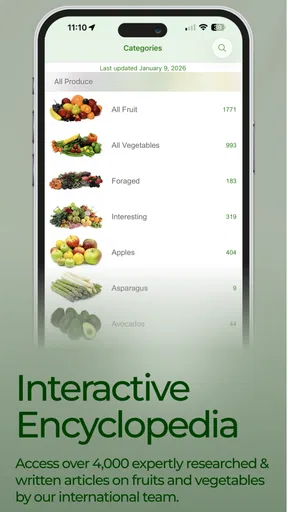
Now, let me tell you about my experience with this app. I downloaded it on a whim, curious to see what it could offer. Right off the bat, Specialty Produce opens up a world of information about fruits and vegetables you might never have heard of. Think of it as your digital encyclopedia for all things fresh and edible.
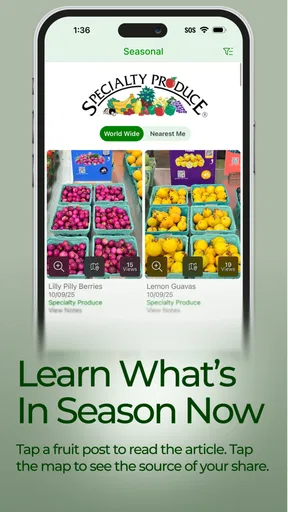
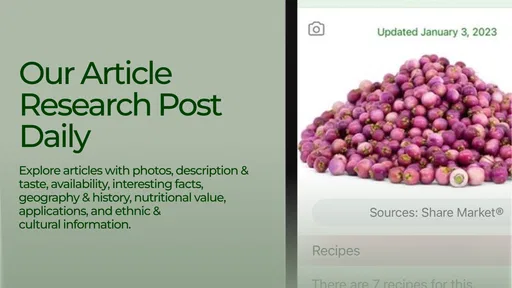
One of the coolest features is the "Produce of the Day." Each day, you get a spotlight on a different item, complete with its history, nutritional info, and fun facts. It's like a mini-lesson in your pocket, perfect for those of us who love learning something new every day.
Where its specialty focus pays off
The best use is often not a grand cooking project but a quick decision at the counter. If an unfamiliar item catches my eye, I can use its entry as a starting point, then follow up with the recipe ideas to see whether it fits a meal I actually want to cook. This creates a simple workflow: identify the produce, learn a little about it, check possible uses, and only then decide whether to buy it.
Worth Reading Before You Choose

EA SPORTS FC Mobile 26 Is a Bigger Football Game, but It Takes Time

Flipboard Shows What News Apps Must Do Beyond the Feed

Switching to Android Auto Means Rethinking Your Driving Routine

Google Calendar Makes a Crowded Week Easier to Manage

Ludo King Makes the Most of the Minutes Between Plans

Baby Panda World Brings Quick Play to Modern Phones, but Its Game Library Feels Busy
There’s also value in browsing before shopping. A daily feature can introduce an ingredient I wouldn’t have searched for, while the broader collection gives me a reason to consider something beyond my usual rotation. I’d use that as inspiration rather than a strict meal plan: availability and personal taste still matter, and a recipe suggestion is most useful when I can adapt it to the produce I can actually find.
A Handy Tool for Every Foodie
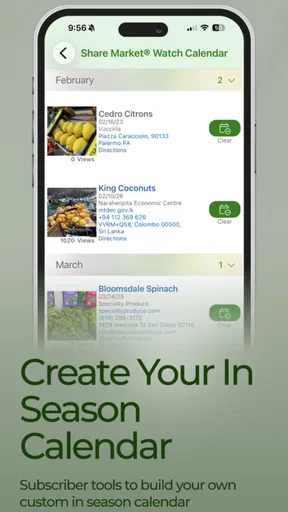
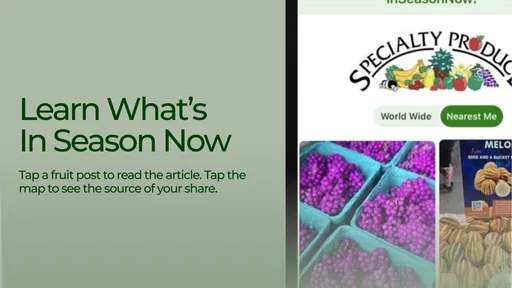
The app is not just about knowledge; it’s incredibly practical too. Ever found yourself wondering where you can find a rare ingredient? The app’s "Nearby" feature uses your location to show you stores that stock the item you’re after. It’s a lifesaver for those ambitious recipes that call for exotic components.
For a less ambitious errand, I’d check Nearby before making a special trip for one ingredient. It can point me toward a store to investigate, but I’d still treat the result as a lead rather than a guarantee that the item is on the shelf at that moment. For time-sensitive shopping, calling the store before travelling is a sensible extra step. That distinction matters: a location tool can make the search easier without removing the uncertainty of real-world stock.
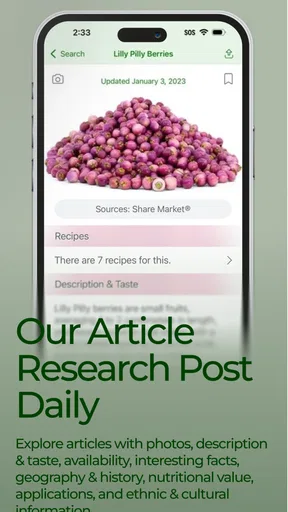
What really stands out to me is the recipe section. You get access to a plethora of recipes tailored to whatever produce you’re interested in. Whether you're dealing with dragon fruit or Romanesco broccoli, the app provides you with creative ways to incorporate them into your meals.
How it compares with familiar alternatives
Compared with a general recipe search, this app starts from the fruit or vegetable rather than asking me to name a dish. That makes it better suited to the moment when I have an ingredient but no clear plan. A standard grocery list or meal planner is more useful for organizing a known menu, and a broad cooking reference may be the better choice when I want detailed technique across many kinds of dishes. I see Specialty Produce as a focused companion, not an all-purpose kitchen manager.
There is a trade-off to that focus. Its produce-led approach can spark ideas, but it doesn’t remove the work of deciding what suits my household, budget, or cooking time. I still need to judge whether a recipe feels manageable and whether its other ingredients are practical. If I already know exactly what I’m making, searching directly for that recipe may be faster than browsing an ingredient guide.
All About User Experience
One thing I always look for in an app is how intuitive it is. Nobody wants to spend ages trying to figure out how to navigate an app when all you want is some quick info. Thankfully, Specialty Produce nails it with a clean and user-friendly interface. It’s straightforward, making it easy for anyone to jump in and explore.
For a useful first session, I’d look up one produce item I already buy and one I don’t recognize. The familiar entry gives me a point of comparison, while the unfamiliar one shows whether the explanations and suggestions answer the questions I actually have. I’d also try the same search while planning a meal, rather than only browsing casually. That is a quick way to decide whether its information is practical for my routine or mainly entertaining.
The visuals are part of that experience, but they’re most useful when I’m trying to recognize an item rather than simply admire it. Produce can have unfamiliar names, and a visual reference can help connect the word on the screen with what I’m seeing in a shop. Still, a picture is not a substitute for checking the actual item: shape, size, and appearance can vary, and I would not use an image alone to judge freshness or quality.
What to know before switching to it
Trying it does not mean I need to abandon a recipe app, cookbook, or shopping list. I’d use Specialty Produce at the discovery stage, then return to whichever tool handles the rest of my cooking routine best. That low-commitment approach is useful if I’m unsure whether I’ll keep using it: test it on a few real shopping decisions before changing habits or relying on it for a special meal.
The app is free to download, though in-app purchases are available, with items ranging from around three dollars to around twenty-five dollars. I’d explore the no-cost experience first and consider a purchase only if a specific paid option clearly fits how I use it. Its average rating is three and a half stars from around nine hundred ratings, and it has more than a hundred thousand installs. Those figures suggest a meaningful audience, but they don’t tell me whether it suits a particular cook; trying the searches and workflows that matter to me is a better test.
What’s in It for You?
If you’re someone who loves cooking, wants to eat healthier, or simply enjoys learning about what you eat, this app is a treasure trove. It bridges the gap between you and the fascinating world of fruits and vegetables. Plus, it’s a great conversation starter. Next time you’re at a dinner party, you can drop some cool facts about the history of kiwifruit or the nutritional benefits of kale.
There are a couple of practical boundaries I’d keep in mind. Its Everyone age rating makes it approachable for a broad audience, but that does not make every recipe suitable for every diet or household; I’d still check ingredients and make personal adjustments. And while the app can make exploration more inviting, someone who prefers a short, fixed list of familiar recipes may find its discovery-first style less useful than a conventional cookbook or meal planner.
A clear recommendation for curious cooks
Specialty Produce is a Food & Drink app from Specialty Produce Productions, and its current version is 8.3.0. It has been available since March 12, 2011, and requires iOS 12 or later. I’d recommend it most to people who regularly encounter produce they don’t know, enjoy learning while they shop, or want ingredient-led inspiration without starting from a finished dish.
I’d skip it if I wanted only a tightly organized weekly menu, a guaranteed real-time stock check, or a complete guide to every part of cooking. For those needs, a meal planner, a direct call to a shop, or a broader cooking reference is a more natural fit. But for the moment when an unfamiliar fruit or vegetable turns a routine grocery trip into a question, I find this focused guide worth trying. The Specialty Produce app is more than just a tool; it’s an adventure through the world of produce. Whether you’re a seasoned chef or a curious newbie, it’s got something for everyone. So, why not give it a whirl? You never know what delicious discoveries await you.
Pros
- Extensive database of global produce.
- User-friendly interface for easy navigation.
- Frequent updates with new produce info.
- Detailed nutritional and culinary data.
- Offline access for convenience.
Cons
- Limited to English language only.
- Occasional bugs with image uploads.
- Subscription required for full access.
- No community interaction features.
- Requires regular updates for accuracy.
FAQs for Specialty Produce
What is Specialty Produce, and how does it work?
Specialty Produce is a comprehensive app that provides users with detailed information about a wide range of fruits, vegetables, and herbs. It offers high-quality images, nutritional facts, and usage tips. The app also features a robust search function that allows users to easily find produce information, making it a valuable resource for chefs, food enthusiasts, and home cooks alike.
Is Specialty Produce available for both Android and iOS?
Yes, Specialty Produce is available for download on both Android and iOS platforms. Users can find it on the Google Play Store for Android devices and the Apple App Store for iOS devices. This cross-platform availability ensures that users can access the app's features regardless of their preferred device.
Does Specialty Produce require an internet connection?
While Specialty Produce offers offline access for some features, such as previously downloaded content, a stable internet connection is recommended to fully utilize all its functionalities. This includes accessing the latest updates, new produce entries, and additional resources that enhance the app experience.
Are there any subscription fees or in-app purchases in Specialty Produce?
Specialty Produce provides a free version with basic features, but it also offers a premium subscription that unlocks additional content, exclusive updates, and ad-free browsing. Users should review the app's in-app purchase options to determine if the premium features align with their needs and budget.
How frequently is the information in Specialty Produce updated?
The app is regularly updated to include new produce items, enhanced images, and the latest nutritional information. Updates are typically rolled out periodically to ensure users have access to the most current and accurate data. Checking for updates often is recommended for the best user experience.


